Choose the client
Search your local client list or create a new client for the work at hand.
Mac desktop app Timekeeping without the interruption
Capture client calls, preparation, follow-up, research, project work, and administration with a movable timer that stays out of your way.
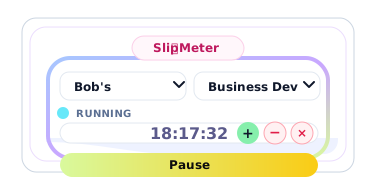
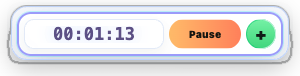
Unobtrusive by design. Mini and micro views stay out of your way.
Context, not just hours. Keep every comment and activity with its time.
Your records stay useful. Report, export, combine, and prepare for invoicing.
How it works
SlipMeter turns the small moments around professional work into structured records without making timekeeping feel like another job.
Search your local client list or create a new client for the work at hand.
Use calls, preparation, follow-up, research, design, administration, or your own activity names.
Add a comment, classify the time, record an outcome, and save a complete slip.
Review work by client, activity, billing status, or date and export it for other systems.
Three views, one timer
Keep the full slip open when documenting details, collapse to a compact working view, or shrink to a narrow timer when screen space matters.
More than elapsed time
Each record can carry the information that makes the time understandable later, whether you are reviewing your own week or combining records across a team.
From timer to insight
SlipMeter keeps the record close to the moment it happened. That means cleaner client histories, better workload analysis, stronger productivity reporting, and fewer missing details when billing or reviewing results.
Start your 30-day trialSimple pricing
Start with a full standalone trial. Keep your clients, activities, reports, exports, comments, and outcomes for one straightforward annual price.
SlipMeter for Mac
$29.99per year after trial
Download for Mac
Register with your name and email to receive the latest SlipMeter installer and essential product updates. Have a promotional code? Apply it before you submit.
Need help? Email SlipMeter support.
Questions, answered
SlipMeter is deliberately simple to start, while still supporting disciplined reporting as your work grows.
Ask a different questionYes. SlipMeter is a standalone Mac app. Create local clients and activities, save slips, run reports, and export your data without another platform.
SlipMeter warns you before closing. The elapsed time is stopped and the current slip is saved so work is not silently lost.
Yes. SlipMeter asks for confirmation, saves the current slip, and resets the timer for the new client.
Yes. You can edit elapsed time, identify running and pending slips, and complete or save records from the app.
Yes. Export detailed records, including comments and classifications, for reporting, analysis, invoicing preparation, or consolidation.
Yes. The current macOS installer is signed with a Developer ID and notarized by Apple.

SlipMeter
Capture the work, preserve the context, and give every working minute a useful place to land.
Download for Mac